Portable Data Encryption Device
A Raspberry Pi device that keeps a USB drive encrypted, with nothing to install on the computer. My final-year project.
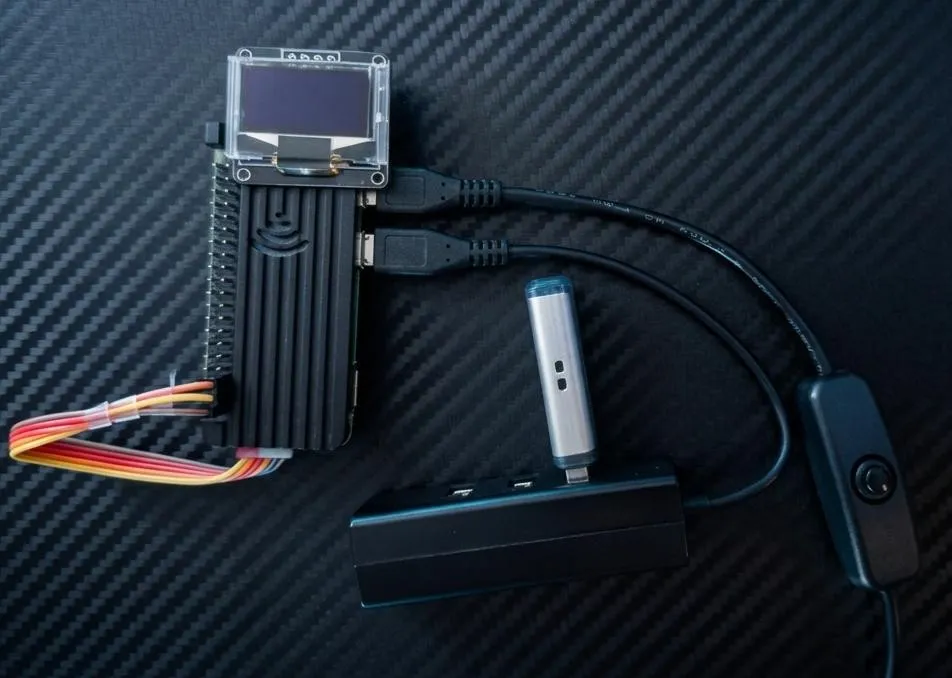
In short
- What it is: a small Raspberry Pi device that keeps a USB drive encrypted. If the drive is lost or stolen, the files cannot be read without the passphrase.
- What makes it different: nothing has to be installed on the computer, and every part of the encryption is open source, so it can be checked.
- Result: all 9 functional tests passed.
- My role: I built the device and wrote the Python code myself, as my individual final-year project for my BSc (Hons) Cyber Security & Digital Forensics at Kingston University London (First-Class Honours degree).
The problem
Lost or stolen USB sticks expose every file on them. Each existing option has a drawback:
- Software tools such as VeraCrypt must be installed on every computer you use.
- BitLocker only works on Windows and is closed source.
- Hardware encrypted drives use closed firmware that nobody outside the maker can check, and research has found flaws in some of them.
I wanted strong encryption with nothing to install on the computer and a fully open-source encryption stack. It is meant for people who carry sensitive files, such as staff in healthcare, education, legal work and small businesses.
How it is used
The USB drive plugs into the Raspberry Pi. I control the Pi from a computer over SSH, which is already built into Windows and macOS, so nothing extra is installed. There are five commands:
| Command | What it does |
|---|---|
setup |
Prepares a new drive (one time only). |
open |
Asks for the passphrase, then unlocks and mounts the drive. |
status |
Shows whether the drive is locked or open. |
close |
Unmounts the drive and locks it again. |
change password |
Replaces the passphrase. |
A small OLED screen on the device shows the current state, for example “USB Ready”, “Wrong Password” or “Locked”.
The computer does not see the device as a normal USB drive; I control it over SSH. Unlocking without SSH is one of the ideas I’m exploring, below.
Results
All 9 functional tests passed. I measured performance with six file sizes, from 100 MB to 8 GB:
| What I measured | Result |
|---|---|
| Write speed (files over 500 MB) | 16.1 to 16.9 MB/s, limited by USB 2.0, not by the encryption |
| Time to unlock | 8.9 to 25.4 seconds, mostly Argon2 |
| Time to lock | under 2 seconds |
| CPU temperature rise | at most +2.1 °C, so passive cooling is enough |
Technical detail
How the parts connect
- Computeryou type the commands
- SSHbuilt into Windows and macOS
- Raspberry PiPython controller
- cryptsetup / dm-cryptLUKS2 encryption
- USB drivestays encrypted
Hardware
- Raspberry Pi Zero 2 WH (512 MB RAM)
- SanDisk 128 GB USB drive (the encrypted drive), connected through the OTG port and a small hub
- 64 GB microSD card for the operating system
- 0.96” SSD1306 OLED screen over I2C
- GeeekPi aluminium passive case with heatsink
- Raspberry Pi OS 64-bit (Debian 12)
For the OLED wiring I followed a public tutorial by Raspberry Pi Spy.
Software
Two Python modules:
encryptor.pyhandles setup, open, close, status and password change. It also checks password strength, checks every input, handles errors and logs speed and timing figures.oled.pydrives the screen.
All encryption is done by cryptsetup (LUKS2 on dm-crypt), called from Python. The screen is separate: if it fails, encryption still works.
Why these choices
- LUKS2: the open Linux standard for full disk encryption.
- AES-256-XTS: the standard mode for disk encryption. It stops patterns in the data from showing, and it costs no speed here because USB 2.0 is the limit.
- Argon2: a memory-hard key derivation function, so guessing passwords becomes very slow and expensive.
Threat model
What the device protects against, and what risk is left:
| Threat | How it is handled |
|---|---|
| Lost or stolen drive | Full-volume AES-256-XTS encryption. Without the passphrase the drive cannot be read. |
| Offline passphrase guessing | Argon2 makes every guess slow and memory-expensive, and setup rejects weak passwords. Risk left: a weak passphrase set before the password policy. |
| Attacks on closed firmware | Avoided: the whole stack is open source (cryptsetup, dm-crypt). |
| Access while the drive is open | The drive only opens with the passphrase, and close locks it again. Risk left: a compromised computer can read files while the drive is open. |
| Changing the encrypted data | Not fully protected: AES-XTS gives confidentiality only. dm-integrity would fix this. |
| Passphrase in memory | Passed through stdin and never logged; a temporary file with 600 permissions is deleted after use. Risk left: no mlock, so swap could expose it. |
Out of scope: a compromised host computer during an active session.
Problems I solved
- Unlocking crashed. On 512 MB of RAM, the Linux out-of-memory killer stopped
cryptsetup. I redesigned the controller to run one operation at a time. - The Pi would not connect. The Pi Zero 2 W only supports 2.4 GHz Wi-Fi and my router was on 5 GHz. I enabled 2.4 GHz and set a static IP address so SSH stayed stable.
- The screen went blank when the script ended. I removed the display library’s exit handler, so the last status stays on screen.
- A typo could have half-wiped a drive. Setup now collects all passwords and a confirmation before it wipes anything.
The 9 functional tests (all passed)
- The correct password opens and mounts the drive.
- A wrong password is rejected and the drive stays locked.
- A normal close locks the drive.
- Opening a drive that is already open does nothing.
- Closing a drive that is already closed is safe.
- A weak password is rejected during setup, before anything is wiped.
- Status shows the correct state.
- Files stay intact across many open and close cycles.
- Password change works: the new password opens the drive and the old one fails.
Known limits
- No integrity protection: AES-XTS hides the data but does not detect changes. dm-integrity would fix this.
- Speed is limited by USB 2.0.
- One drive only.
- It needs SSH to control it.
- 2.4 GHz Wi-Fi only.
- No secure erase.
- The passphrase is not locked in memory (no
mlock). - Unlock time varies, and I did not isolate the cause.
What I learned
- How full disk encryption works in practice: LUKS2, dm-crypt and Argon2.
- How to write a threat model and be honest about what is out of scope.
- Testing on real hardware finds problems you do not see on paper, such as the memory limit.
Ideas I’m exploring
- Unlocking without SSH, for example with a small button or keypad on the device.
- A duress passphrase: a second, emergency passphrase that destroys the encryption keys, so the data could never be read if someone forced me to unlock the drive.
- Adding dm-integrity, so the device could also detect if the encrypted data has been changed.